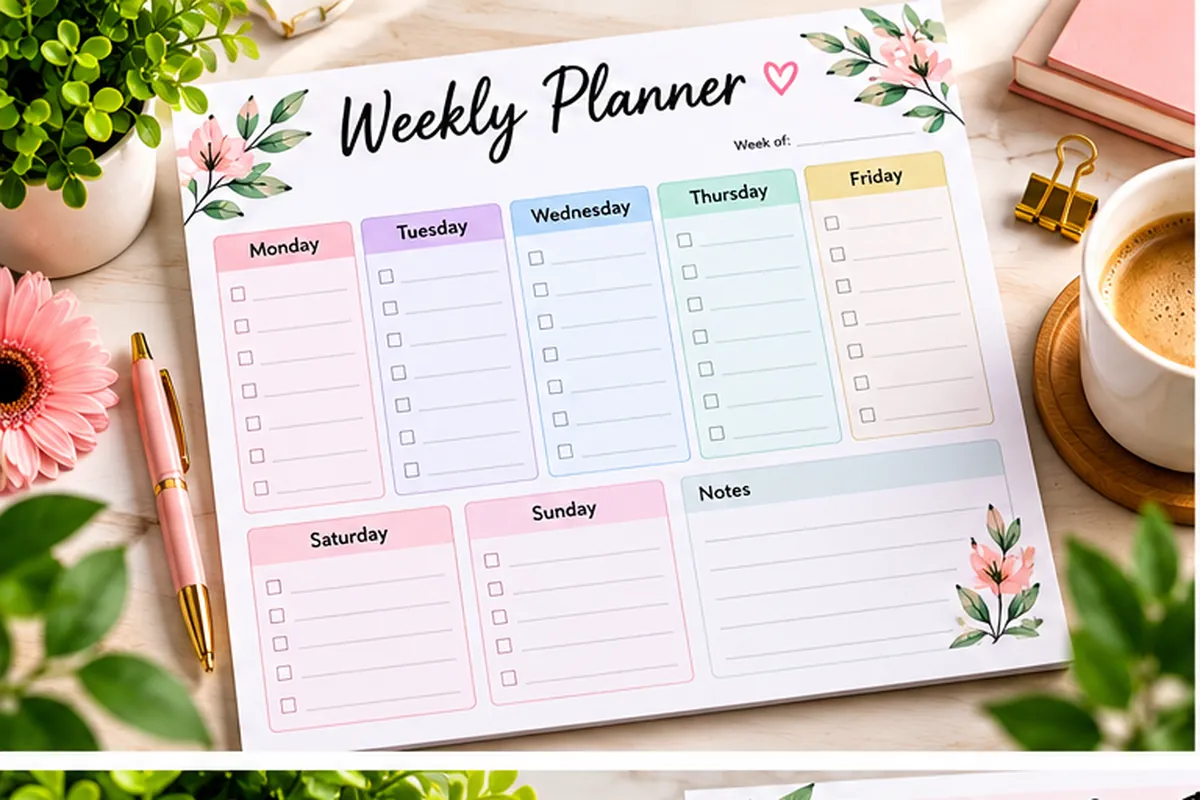
A weekly planner offers you one single spot to plan your tasks, goals, appointments, habits, meals and personal priorities for the whole week. Gone are the days of trying to remember everything and the days of switching between different notes as everything is visible in one place for the whole week.
If you are looking for a planner that offers more than just a Monday to Sunday schedule, the weekly planner below is for you. It includes daily planning, goal setting, habit tracking, meal planning, hydration, appointments and weekly reflection. This is helpful for students, professionals, parents and anyone who needs to have a packed week without a complicated planning process.
Simple enough to use weekly, but you have plenty of room to set-up the areas that are important.

Start With the Week and Month
Week Of and Month are available at the top of the planner.

This might seem like a minor thing but having the date on your planner pages will make it easier to keep things tidy. Several copies can be made and stored in a folder or binder for easy reference to past weeks.
The other benefit of writing the date first is that you have a clear starting point. It helps you to know the exact seven days you will be busy with before you start to add tasks and goals.
Top Priorities
The Top Priorities section provides you with space to write down your top 3 priorities for the week.
If everything is on your shopping list, it can feel like it’s all equally important. With three priorities, you’ll know what’s really important to you.
Your most important task could be finishing a work task, studying for a test, attending a crucial appointment or a personal duty.
Engage in activities that will make a positive impact on the course of the week. If all else goes out the window, then these are the things you still want to do.
Weekly Goals
Your priorities are next to the planner are a section for Weekly Goals.
Goals will help you steer your week. Rather than setting an overall goal like “Exercise More,” you can set a more specific goal like “Exercise 4 times this week”.

The same applies to work, studies, personal projects, health or tasks in the home.
Make sure your weekly goals are attainable. A good weekly planner should help you to make progress rather than feel overwhelmed by an unrealistic list.
Focus Area
In the Focus Area section you need to determine which primary direction you will concentrate your efforts during the week.
Your focus area does not have to come from your regular task list. You might choose to focus on better health, study, family, work, fitness, a personal project, or simply building a more consistent routine.
It may be easier to make decisions when there is one main focus. If you get busy during the week, you can review if you still have time to support the area you mentioned that you want to support.
Make a plan for Monday through Sunday.
There is a separate column for each day of the week in the middle of the weekly planner.
There is room for tasks each day and a small area with a line that starts “Today I will…”.
Begin with set appointments, events, meetings, deadlines, schoolwork, etc. Once you have that, add some flexible tasks that can be done around them.
Be careful not to over schedule the day. The more realistic your schedule, the better a planner will work for you. If you leave some space open, you have a chance for the unexpected task or change.
Another place you can use for making one simple intention for the day is the “Today I will…” area. It could be something really important you have to do, a goal for yourself or something easy you want to make sure you get done.
Habit Tracker
The Habit Tracker ensures you are able to keep track of smaller habits throughout the week.
It can be used to jot down several habits in the left column, and then to cross off the days when they’re done.

Consider monitoring behaviors like:
- Exercise
- Reading
- Journal
- Studying
- Taking vitamins
- Sleeping at the right time
The idea isn’t to have a flawless week. The tracker just provides you a visual representation of your consistency.
When you realize you are not getting in your habit on some days, then you can change something in your plan without trying to figure out why it didn’t work.
Important Appointments
The Important Appointments section helps you to organize your appointments that may be time sensitive and not on your normal task list.
This can serve as a location for medical appointments, meetings, interviews, school events, calls, deadlines or appointments.
It is a great idea to keep significant events in one section so that is easy to see on a quick glance when you are looking at your weekly planner.
If you wish to get another reminder, you can type the same appointment on the right day of the month.
To-Do List
There is a bigger To-Do List for items that are not necessarily for one day but could be a task in general.
This is helpful when you know that something needs to be done on the week, but you haven’t figured out just when.
List these activities first here. Once your schedule becomes clearer, you can then transfer them to the daily sections.
This way, you don’t get too many columns in your daily columns too soon.
Meal Plan
The Meal Plan section includes all 7 days of the week.
Preparing a meal ahead of time can be helpful in saving time and avoiding the last minute decision. Write one idea for dinner each day or plan a lunch or use the section for the meal that is important to you most.
You can also save on grocery shopping knowing what ingredients you are going to need before the week begins by having a simple meal plan.
No need to make elaborate meals. Even a simple plan can help to keep the week more structured.
Water Tracker
The Water Tracker provides an easy-to-follow graphic representation of how much water you are drinking each day.
There are 8 water-drop symbols and a goal of 8 glasses of water per day in the planner.
You can mark off each glass as you consume them throughout the day. This makes it easier to monitor hydration without having to keep another app or other checklist.
It’s very simple, but it works well within a weekly plan that is geared toward productivity and personal wellness.
Notes
The Notes section provides additional space for notes that do not fit in other sections of the planner.
It can be used to remind yourself of something, for a thought or idea, for shopping lists, for a phone number, to remember something to follow up on, for anything you can think of during the week.
One set of notes area will prevent random notes from getting mixed in with the day to day task areas.
Weekly Reflection
The Weekly Reflection section at the end of the planner asks you to take some time to reflect on the week instead of jumping right into the next one.
It has prompts for your biggest win, what went well, what you can do better and what you are grateful for.
This section can be useful over time for noticing patterns on your weekly planner.
If something worked well this week, carry it forward into the next one. If your schedule felt too crowded, reduce the number of tasks you plan. When a habit starts to feel easier, keep building on that progress.
The weekly reflection will allow you to develop a planning process that becomes more realistic as you gain experience.
Get the most out of your weekly planner
If a weekly planner is supposed to make your life easier, then it isn’t.
You don’t need to complete all the boxes and use all the sections to perfection. The trick is to begin with the components that are most beneficial to you. Some people might be more focused on the daily tasks and appointments, or they might find themselves using the habit tracker, meal plan or the weekly reflection more frequently.
Organize your schedule, priorities, goals, habits, meals, appointments and personal notes all in one place with this weekly planner. It takes less than five minutes to plan in the beginning of the week and less than a minute a day to review, and you’ll spend less time trying to figure out what you should do next.
FAQs About the Weekly Planner
1. Who is this weekly planner for?
This weekly planner is suitable for students, professionals, parents, freelancers, and anyone who wants to organize their week in one place.
2. What can I track with this weekly planner?
You can track daily tasks, weekly goals, priorities, habits, appointments, meals, water intake, notes, and weekly reflections.
3. How do I use a weekly planner effectively?
Start by adding your main priorities and appointments, then plan daily tasks and review the planner throughout the week.
4. Is this weekly planner printable?
Yes, this weekly planner is designed as a printable template that you can print and use whenever you need a fresh weekly plan.
5. What are the benefits of using a weekly planner?
A weekly planner helps you organize your time, stay focused on important tasks, track progress, and see your whole week at a glance.